Edit PDFs.Keep them yours.
A free, open-source PDF editor for Windows and Linux. Leaf works offline, so your documents never leave your computer.
Latest version. Free and open source, for Windows 10 and 11 and Linux.
IEdit text tool
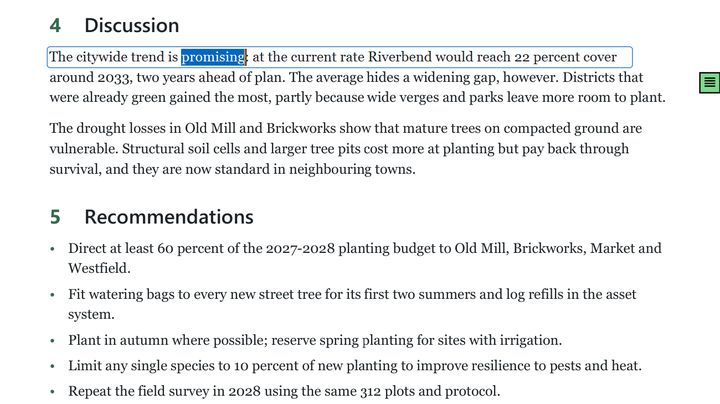
Change the words that are already there.
Click a line and type. Leaf rewrites it in the document's own embedded font, at the same size, color and angle, and Tab switches between a single line and the whole paragraph. When you save, the file is rewritten so the old words are really gone, not hidden underneath.
Find & replace (Ctrl H) uses the same engine across the whole document. Where Leaf can't make a change faithfully, for example in Arabic, Hebrew or Indic scripts, or text without a reliable character mapping, it tells you why instead of guessing.
XRedact tool
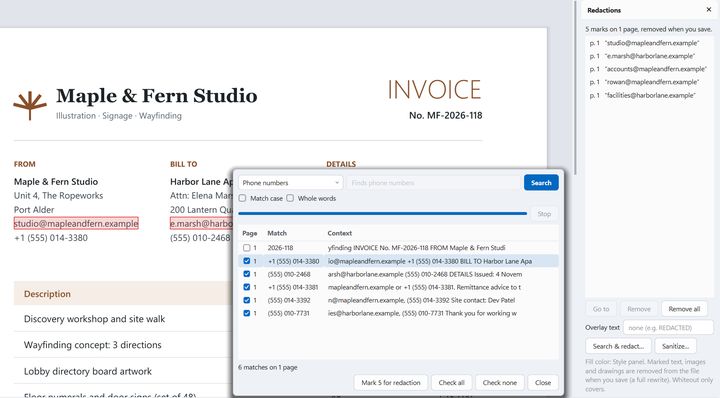
Redaction that really removes.
Drag across text or draw a box. When you save, the text, image pixels, drawings, annotations, form fields and links under each mark are removed from the file, not covered with a black rectangle.
Search & redact finds email addresses, phone numbers, card numbers, IBANs, dates or a pattern of your own, and lists every hit for you to check before anything is marked.
Sanitize document strips metadata, JavaScript, attachments, comments, hidden text and more. If a redaction would break a digital signature, Leaf names it before you save.
Forms menu
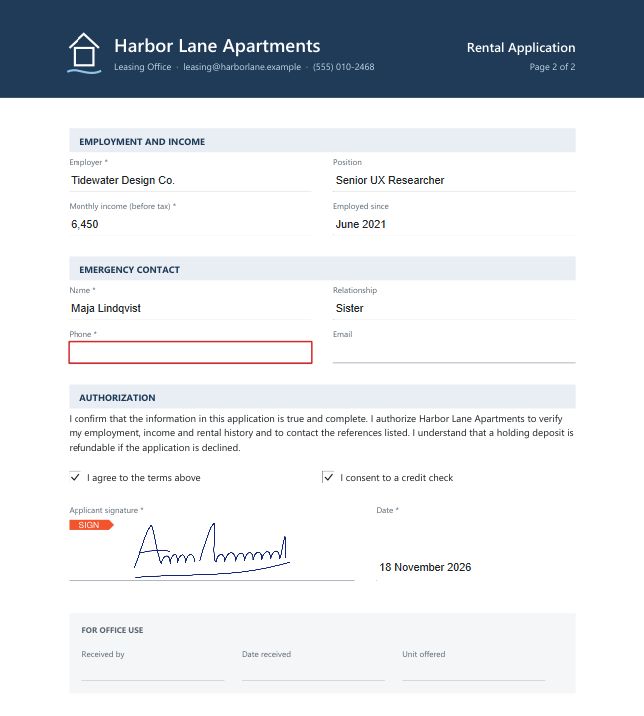
Fill it, sign it, done.
Type into fields, tick boxes and pick from lists. Tab follows the document's own field order, and required fields are marked. Then add a signature you drew, typed or imported: Leaf removes the background and keeps it in your library for next time.
You can also create new fields, export and import form data as JSON or XFDF, and save a flattened copy.
F12Signatures panel
Sign with your own certificate.
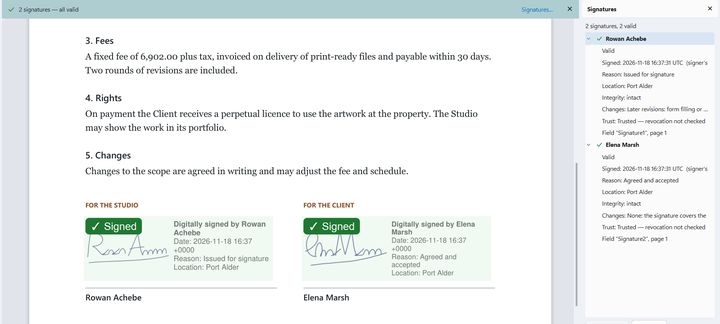
Leaf adds PAdES digital signatures with your .p12 or .pfx file, or with a self-signed certificate it creates for you. Make them visible, with your handwritten signature, or invisible, add a timestamp from a server you choose, or certify a document.
Open a signed PDF and Leaf checks each signature's integrity, later changes, trust and timestamp, offline. Saving only adds to a signed file, so existing signatures stay valid.
Document › Recognize text
Make scans searchable.
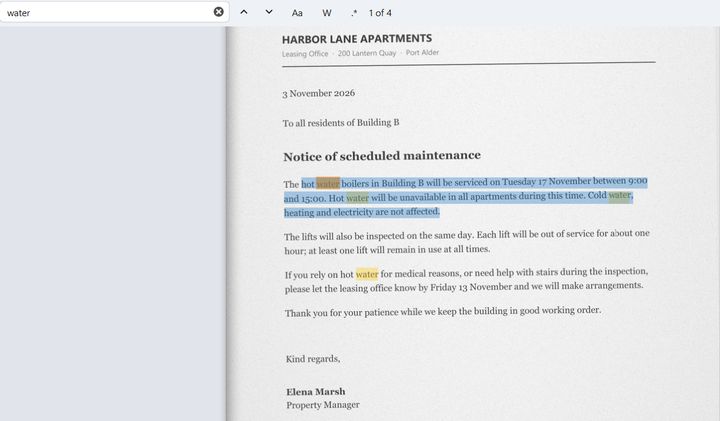
Scanned pages become text you can search, select and copy. Recognition runs in the background with per-page progress, and Leaf offers it when a document looks scanned.
English is built in. Add languages… downloads others, such as Hindi, Arabic, Cyrillic or Chinese, when you ask for them. Only the language data is downloaded; your documents stay put.
CtrlShiftOOrganize pages
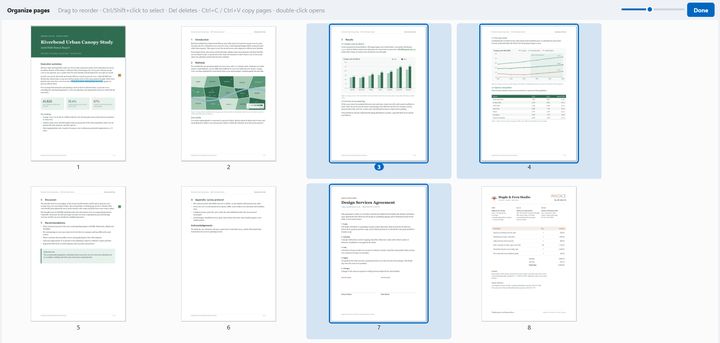
Pages, your way.
Drag pages into order in the sidebar or in the full-window organizer. Rotate, delete and duplicate them, insert pages from another PDF, or copy and paste them between windows.
Extract a range such as “1-3, 7, 10-”, split every few pages, or crop by dragging a rectangle, by margins, or by trimming white space automatically.
F9Comments panel
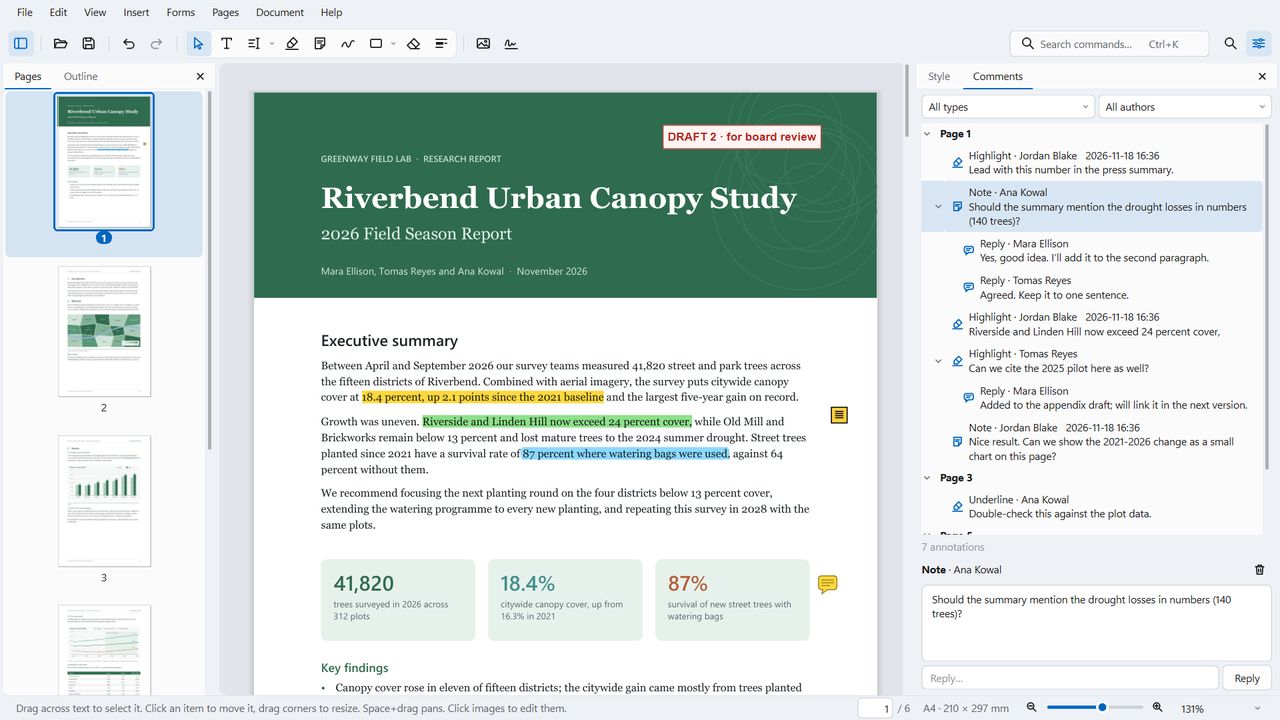
Mark it up.
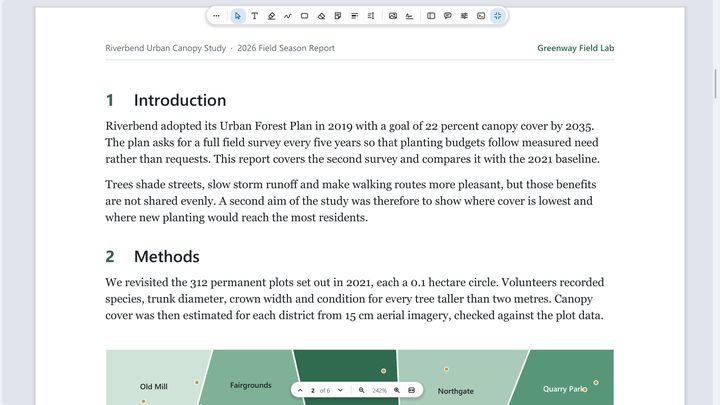
Highlights, sticky notes with threaded replies, freehand ink with pen pressure, shapes, arrows and formatted text boxes in any installed font. Comments already in a file, from any app, can be moved, restyled or deleted, and the ones you don't touch are saved exactly as they were.
Undo is unlimited, with a History panel. Whiteout only covers what's under it; to remove content, use Redact.
- H Highlight
- N Sticky note
- D Draw
- T Text box
- R Rectangle
- E Ellipse
- L Line
- A Arrow
- W Whiteout
- V Select
CtrlShiftFFocus mode
Calm to read, at home on Windows 11.
Leaf follows Windows 11: rounded panels, your accent color, a matching title bar and the system font, in light or dark as your system is set. On Linux it follows KDE and GNOME.
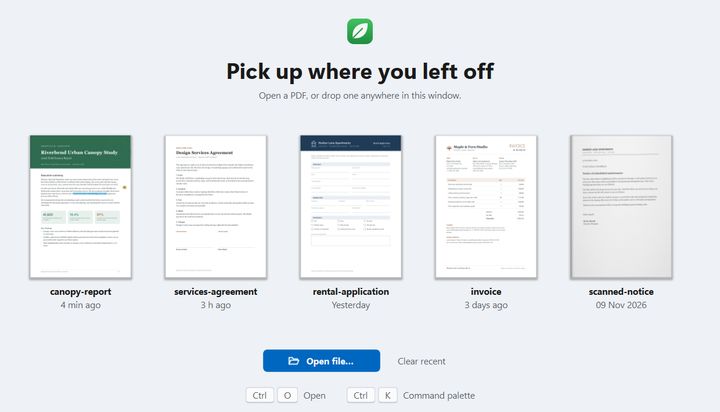
Focus mode hides everything but the page. A floating toolbar and a page and zoom bar slide away while you read; Esc brings the window back. The start screen shows your recent files as page previews, and each file reopens where you left off.
File › Share
Right where your files are.
Share opens the Windows share sheet. Copy file puts the PDF on the clipboard for a folder, an email or a chat, and Email… attaches it in your mail app. With unsaved changes, Leaf asks whether to save first or share a copy.
In File Explorer, right-click a PDF for Edit with Leaf, or select several and choose Combine with Leaf to get one new document. Leaf can also be your default PDF app; Windows asks you to confirm that in Default apps.
 Edit with Leaf
leaf --merge a.pdf b.pdf does the same from a terminal.leaf --help
For developers and agents.
The same engine runs without a window. The leaf command reads text and form fields, fills forms, redacts, recognizes text, merges, splits, crops, signs and more.
Edit sets describe changes as JSON: review them in Leaf and apply them as one undo step, or apply them from the command line. leaf mcp is an MCP server, so agents can read PDFs, find text and write new files. It never overwrites a file and never signs. With the agent link turned on (it's off by default), agents can suggest edits to your open documents, and nothing changes until you accept.
# the words on every page, in reading order
$ leaf text report.pdf

# remove every email address and phone number
$ leaf redact contract.pdf --preset email --preset phone

# make a scan searchable
$ leaf ocr scan.pdf -o searchable.pdf

# apply an edit set
$ leaf apply in.pdf changes.json -o out.pdf

# the MCP server, on stdio
$ leaf mcp
Your documents stay on your computer.
Leaf has no accounts, analytics, telemetry, crash reporting or ads. Documents are opened, edited and saved on your computer and are never uploaded anywhere.
This website works the same way: no cookies, no analytics, no tracking. The download buttons ask GitHub which release is the latest, and that is the only request this page makes to another site.
Leaf goes online only when you ask it to
- Extra OCR languages. Add languages… downloads the files you pick from the Tesseract project on GitHub. No document content is sent.
- Timestamped signatures. If you enter a timestamp server, it receives a hash of the signature, as the PAdES standard requires, never the document.
- Links in documents. A web link you click opens in your browser.
Download Leaf
The latest release is on GitHub. What's new
Windows Your system
Installer (recommended)
Windows 10 and 11, x64. Installs for your user only, with no admin prompt.
Portable zip
Unzip anywhere and run Leaf.exe. Includes leaf-cli.exe for the command line.
Linux Your system
AppImage
x86_64. Make it executable (chmod +x), then run it.
Tarball
The app folder with its desktop entry, metadata, icons and Dolphin service menu, for packaging (AUR, Flatpak).
macOS Your system
Disk image
Leaf for Mac is on its way. Watch the releases on GitHub to hear when it's out.
Apple silicon (M1 or newer), macOS 14 or later. Open the disk image and drag Leaf to Applications.
System requirements
Windows 10 or 11, 64-bit (x64). Linux on x86_64 with glibc 2.34 or newer and libOpenGL.so.0 (libopengl0 on Debian and Ubuntu).
If Windows warns you
The builds aren't code-signed yet, so SmartScreen may show a warning the first time. Choose More info, then Run anyway.
Check your download
Compare the file's SHA-256 with SHA256SUMS.txt. Older versions are on the releases page.
Questions
Is Leaf really free?
Yes. Leaf is free and open source under the AGPL-3.0. There is no trial, no paid tier, no account and no watermark on the files you save.
Does Leaf upload my PDFs?
No. Leaf is a local PDF editor: documents are opened, edited and saved on your computer and are never uploaded. It works fully offline and goes online only when you ask it to, for example to download an extra OCR language.
Can Leaf edit the existing text in a PDF?
Yes. Pick the Edit text tool, click a line and type: Leaf rewrites it in the document's own embedded font, size and color, and removes the old words from the file when you save. Where it can't make a change faithfully, for example in Arabic, Hebrew or Indic scripts, it tells you instead of guessing.
Does redaction really remove the text?
Yes. When you save, the text, image pixels, drawings, annotations, form fields and links under each redaction mark are removed from the file, not just covered with a black box.
Do I need admin rights to install Leaf on Windows?
No. The installer installs Leaf for your user only, with no admin prompt. There is also a portable zip you can run from any folder.
Does Leaf run on Linux and Mac?
Leaf runs on Windows 10 and 11 (x64) and on Linux (x86_64) as an AppImage or a tarball. There is no macOS version yet.
Step-by-step help is in the guides.
Open source, under the AGPL.
Leaf is free software under the GNU Affero General Public License v3.0 or later, the same license as the MuPDF engine it's built on. Read the code, report a problem or send a change.