Merge PDFs, then reorder, rotate and extract pages
Updated 19 November 2026 · Leaf 0.2.2
Leaf joins PDFs on your own computer, so there's no upload limit and nothing to wait for. Once the pages are together, you can put them in order, turn the sideways ones and take out the pages you need.
Steps
-
Combine the files
Choose whichever is handiest:
- File Explorer (Windows): select the PDFs, right-click and choose Combine with Leaf (on Windows 11, under Show more options). They open as one new document, sorted by file name with numbers in order (2 before 10). The right-click menu works for up to 15 files; Send to › Combine with Leaf has no limit. The installer adds both; Send to is an option during setup.
- Inside Leaf: open the first PDF, then choose Pages › Insert pages from file…, or drag PDFs from your file manager onto the Pages panel (F4) where they should go.
- Command line:
leaf --merge a.pdf b.pdf c.pdfopens the files, in that order, as one new document. On Windows, runLeaf.exe --merge …from the folder Leaf is installed in.
-
Put the pages in order
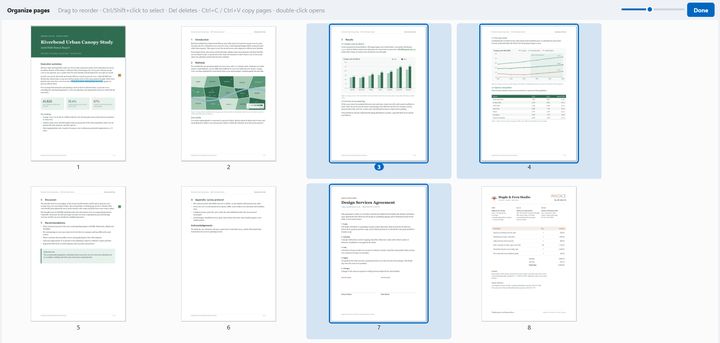
Drag thumbnails in the Pages panel (F4). Select several with Ctrl or Shift and drag them as a block. For a bigger view, Pages › Organize pages (Ctrl Shift O) shows every page in a full-window grid. Move to start (Ctrl Home), Move to end (Ctrl End) and Reverse order are in the Pages menu.
-
Rotate, delete or duplicate pages
Select the pages, then Rotate left (Ctrl Shift L), Rotate right (Ctrl Shift R), Delete pages (Ctrl Shift Del) or Duplicate pages (Ctrl Shift D). You can also copy, cut and paste pages, even between two Leaf windows.
-
Extract or split
Pages › Extract pages… copies a range such as
1-3, 7, 10-into a new file; tick Save each page as a separate file for one file per page. Pages › Split into files… cuts the document every few pages or before each selected page. -
Save
Press Ctrl S and pick a name for the combined document. Every step before this can be undone with Ctrl Z.
Tips
- Crop pages with the crop tool (C): drag a rectangle and apply it to this page, the selected pages, or all, odd or even pages.
- On Linux, the tarball includes a Dolphin service menu that adds Combine with Leaf to the right-click menu; see Leaf on Linux.
Limits
- A crop hides what's outside it; it doesn't remove that content from the file. To remove content, redact it.
- Copied or duplicated pages bring their original comments, not unsaved changes to them.